Windows 10 / 11

Record, replay and automate repetitive tasks at up to 15x speed.

Try free, upgrade to Pro for unlimited repeats and precision controls.

Free Download
Free
No sign-up
LoopMouse v1.3

Record keyboard commands and mouse movements, then replay them in loops. Automate anything repetitive — documents, folders, websites, games and more.

ⓘ  Free version limit: basic recording and replay. Need unlimited repeats and faster speeds? Upgrade to Pro below.

★ Pro License
$25
one-time · USD
Pro Edition

Everything in the free version, plus advanced recording capabilities and precision controls. One-time purchase, no subscriptions.

Pro-only features
Unlimited repeats
Maximum speed (15x)
Save & load automations
Precision timing control

🛡 30-day money-back guarantee  ·  License key delivered to your email

How it works

1
Download & launch
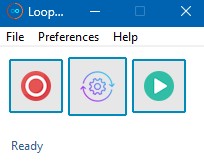
Download the free version above and open it on Windows 10 or 11. The compact interface sits neatly on your desktop, out of the way while you work.

LoopMouse compact view

2
Record your task
Hit record and perform the task once — LoopMouse captures every keystroke and mouse movement. Works with any software, website, folder or game on your desktop.

3
Adjust your settings
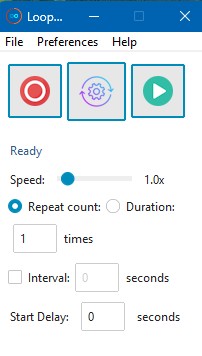
Tap the settings icon in the centre to expand the panel — set your loop count, playback speed, and timing. Tap again to hide. No digging through menus.

LoopMouse settings menu

4
Hit play — sit back
Press play and watch LoopMouse repeat your task automatically, at up to 15x human speed. Hours of repetitive work completed in minutes.

5
Upgrade to Pro (optional)
Click Upgrade in the free version, purchase a license from Gumroad, then paste your key and click Activate. Unlimited repeats, maximum speed, save & load automations, and precision timing control all unlock instantly.